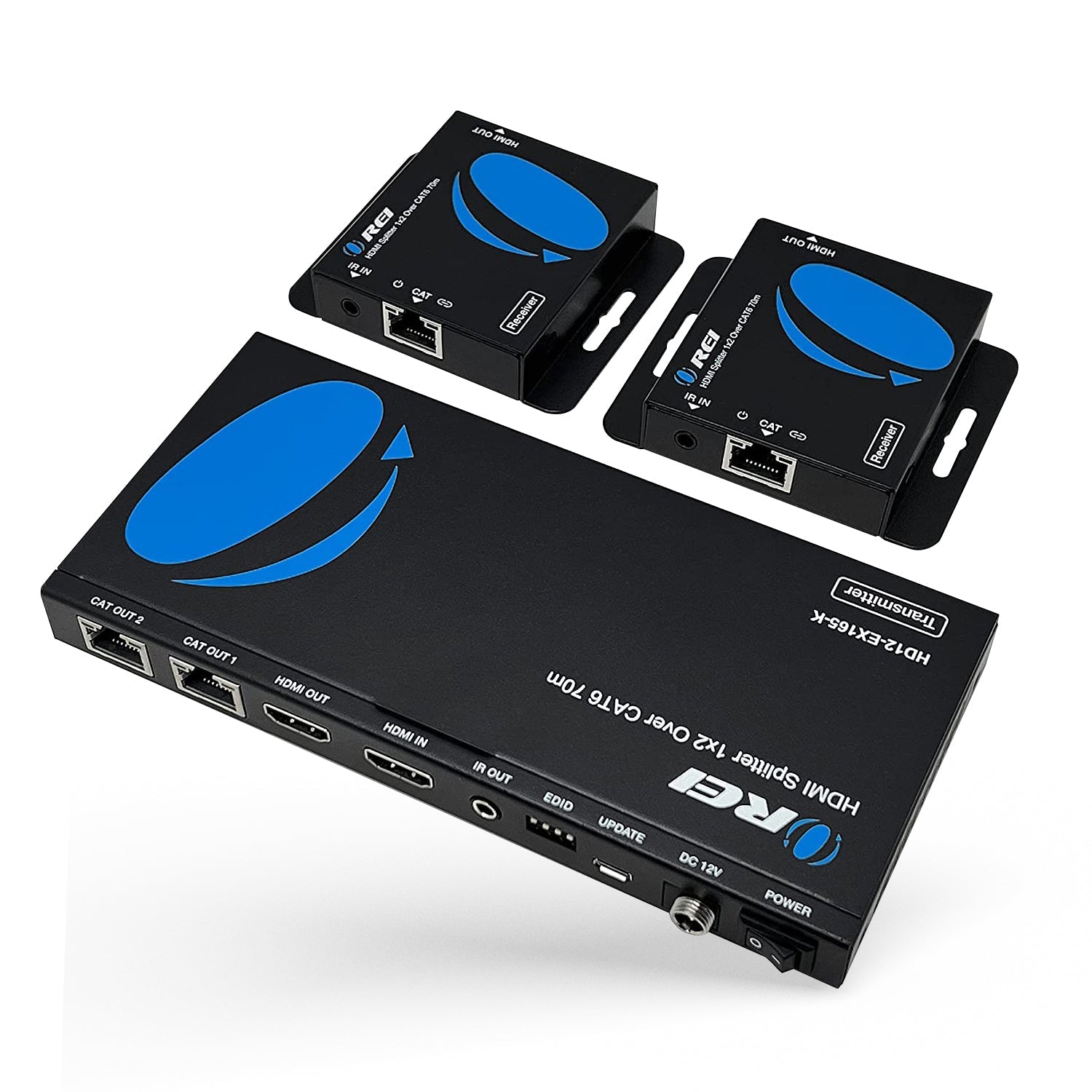
HD12-EX165-K: 1x2 HDMI Extender Splitter over CAT6 up to 165 feet(70m)
Key Features:
-
HDMI 1.4 and HDCP 1.4 Compliant – Ensures compatibility with standard HD sources and protected content.
-
4K@30Hz and 1080p@60Hz Video Support – Delivers high-definition signals for residential and commercial applications.
-
10.2Gbps Bandwidth – Supports smooth transmission of uncompressed audio and video over long distances.
-
Signal Extension up to 230ft – Transmits video up to 165ft at 4K@30Hz and 230ft at 1080p@60Hz over CAT6/7 cable.
-
Audio Format Support – Compatible with LPCM 7.1, Dolby TrueHD, and DTS-HD Master Audio.
-
Unidirectional IR Control – Enables remote control of source devices from the display location.
-
Power over Cable (PoC) – Requires only one power adapter at the transmitter for simplified installation.
-
HDMI Loop-Out on Transmitter – Allows for a local monitor connection at the source end.
-
Advanced EDID Management – Offers display compatibility through manual or automatic EDID settings.
-
Metal Housing with Plug-and-Play Setup – Durable design for long-term use with no configuration
The HD12-EX165-K HDMI Extender Splitter provides a reliable solution for distributing one HDMI source to two displays over long distances. Utilizing a single CAT6/7 cable, it extends 4K@30Hz video up to 165 feet and 1080p@60Hz up to 230 feet with zero latency and uncompressed signal quality. It supports advanced audio formats including LPCM 7.1,
Dolby TrueHD and DTS-HD Master Audio for rich sound reproduction.
The transmitter features an HDMI loop-out for local monitoring and unidirectional IR control to operate the source device from the receiver end. With Power over Cable (PoC) support, only one power adapter is needed, simplifying installation. Its rugged metal housing and plug-and-play design make it ideal for both residential AV setups and commercial display ,solutions
[shortdes]
- 1x2 Extender Splitter over CAT6
- Video reoslutions up to 4K@30Hz and 1080p@60Hz
- Unidirectional IR control
[/shortdes]
[tab]
CONNECTIVITY
| Transmitter: |
INPUT: |
1 × HDMI [Type A, 19-pin female] |
|
OUTPUT: |
1 × HDMI [Type A, 19-pin female] |
|
|
2 x CAT [RJ45, 8-pin female]
|
|
CONTROL: |
1 x UPDATE [Micro USB]
|
|
|
1 × IR OUT [3.5mm Stereo Mini-jack] |
|
Receiver:
|
INPUT: |
1 x CAT [RJ45, 8-pin female]
|
|
OUTPUT: |
1 × HDMI [Type A, 19-pin female] |
|
CONTROL: |
1 x IR IN [3.5mm Stereo Mini-jack] |
PACKAGE CONTENTS
| 1x Transmitter |
| 2x Receiver |
| 1x IR Blaster cable |
| 2x IR Receiver cable |
| 2x Mounting ear |
| 4x Machine Screw (KM3*4) |
| 1x Power Adapter |
| User Manual |
SUPPORTED CAT CABLES
| CAT5e, CAT6, CAT7: |
We recommend you use shielded CAT6 cables & High-Quality HDMI Cables for optimum performance |
EXTENDING DISTANCE
| 4K@30HZ: |
130 Feet |
| 1080P@60Hz: |
230 Feet |
VIDEO OUTPUT
| Video Bandwidth: |
10.2Gbps |
| Video Resolutions: |
Up to 4K@30Hz 4:4:4 |
ADDITIONAL FEATURES
| ARC/eARC: |
No |
| CEC : |
No |
| Transmission Technology : |
Ethernet |
| IR Control: |
Yes, Uni-directional |
| PoC (Power over Cable): |
Yes |
| RS-232: |
No |
| USB Standard: |
No |
| USB-C DP Alt Mode: |
No |
| HDR10 / HDR10+ / Dolby Vision: |
No |
LOOP-OUT/LOCAL PORT
| Has loop out port: |
Yes |
| Number of Loop out ports: |
1 |
AUDIO SUPPORT
| HDMI Audio Formats: |
LPCM 7.1, Dolby True HD, and DTS-HD Master Audio |
COMPLIANCES
| HDMI Compliance |
HDMI 1.4 |
| HDCP Compliance |
HDCP 1.4 |
POWER
| Power Consumption: |
5.4W (Max) |
|
| Power Supply: |
Input: AC 100-240V 50/60Hz |
|
|
Output: DC 12V/1A |
|
DIMENSIONS & WEIGHT
| Transmitter: |
Length: |
175mm / 6.89in |
|
Width: |
82mm / 3.23in |
|
Height: |
18mm / 0.70in |
|
Weight: |
366g / 12.91oz |
| Receiver: |
Length: |
79.5mm / 3.12in |
|
Width: |
69mm / 2.71in |
|
Height: |
16.5mm / 0.64in |
|
Weight: |
130g / 4.58oz |
PROPERTIES
| Color: |
Black |
| Housing: |
Metal Enclosure |
| Operation Temperature: |
0°C ~ 40°C / 32°F ~ 104°F |
| Storage Temperature: |
-20°C ~ 60°C / -4°F ~ 140°F |
| Operating Humidity: |
20~90% RH (non-condensing) |
WARRANTY
| 1-Year Manufacturer's Warranty |
[/tab]
[tab1]Visit Our Help Center for FAQs, Troubleshooting and other queries: HD12-EX165-K
[/tab1]